中文Download Agave
Features

Built for browsing. Ready for collaboration.

Keep web tasks, account environments, and AI access in clear places.

AI web collaboration

Connect an external AI client through MCP to read pages, extract information, and perform authorized interactions.

Separate browsing spaces

Keep work, personal, and other accounts in spaces with independent sign-in state and website storage.

Everyday browsing tools

Tab groups, bookmarks, history, downloads, find in page, screenshots, and printing support your daily work.

Access you can manage

Manage client credentials, tools, browsing spaces, and website capabilities separately. Stop MCP access when needed.

BROWSER × AI

Give your AI a clear target

Copy a web tab reference and share it with your connected client and task.

Read an article, extract information, fill a form, or handle downloads by starting with a clear page and task. A tab reference identifies the target; it does not replace website authorization or restrict access permanently to one tab.
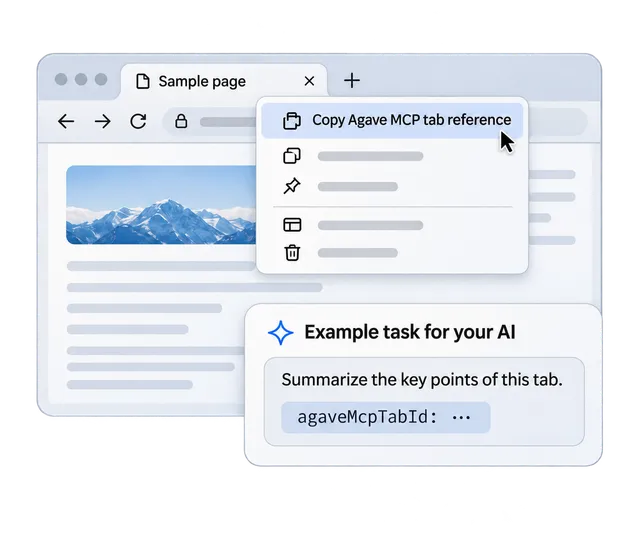
Workflow illustration · not an actual webpage screenshot

Workflow illustration · not an actual webpage screenshot

Browsing spaces

A separate environment for each context

Spaces separate sign-in state and website data. Tabs and groups organize your pages.

  1. Separate account environments

    Each space has its own sign-in state and website storage, so work and personal accounts can coexist.

  2. Keep your tabs together

    Manage tabs from all spaces in one tab bar. Switching spaces does not clear the others.

  3. Scope AI access separately

    Set which browsing spaces a client credential can access. Website permissions still apply independently.

Understand access

Collaborate with clear permissions

Give clients separate credentials and decide what they may read or do on each website. Learn how text redaction differs from screenshots before using them.